

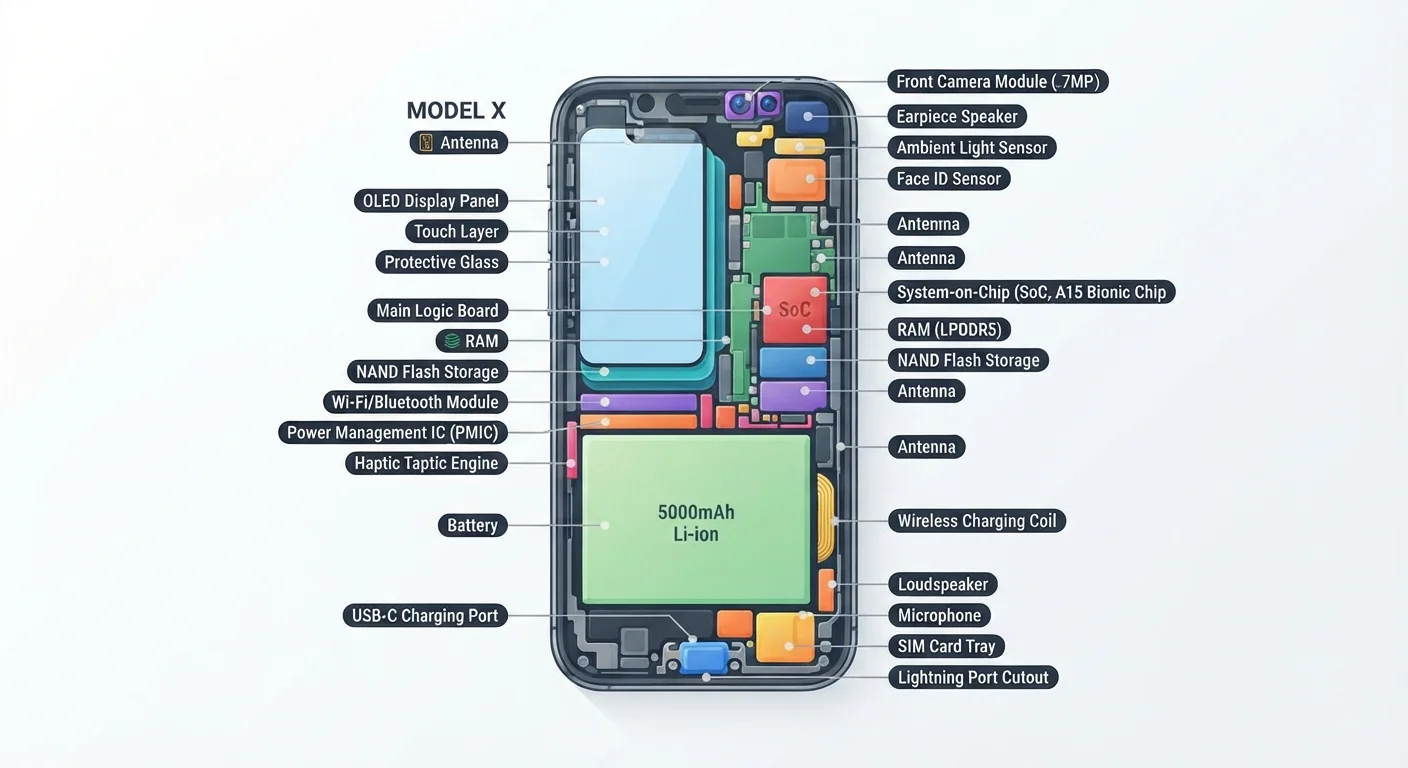
Key Takeaways
- The processor (CPU) runs every app and operation on your phone.
- RAM determines how many tasks your phone can handle at once without slowing down.
- The battery capacity, measured in milliamp-hours, directly affects how long your phone lasts.
- Cameras rely on both the lens hardware and the processor to produce a final image.
- Multiple antennas inside your phone handle Wi-Fi, cellular, Bluetooth, and GPS simultaneously.
- Storage holds your apps, photos, and files even when the phone is powered off.
Smartphone hardware
Smartphone hardware refers to the physical components inside your phone that make it function. Each part has a specific job, and they communicate constantly to deliver the experience you see on screen. Understanding what each piece does helps explain why phones behave the way they do.
Most smartphone components are integrated onto a System-on-a-Chip (SoC), which combines the processor, graphics unit, and modem into a single package to save space and reduce power consumption.
The processor: the phone's decision-maker
The central processing unit (CPU) executes every instruction your phone receives. When you tap an app icon, the CPU fetches the relevant code from storage, interprets it, and carries out the steps needed to display that app on screen. This happens billions of times per second. What a CPU actually does when you open an app covers that process in detail.
Modern smartphone processors contain multiple cores, meaning several processing units on one chip. Some cores are designed for performance-heavy tasks, while others are built for efficiency to conserve battery during lighter work. The processor also includes a graphics processing unit (GPU), which handles everything visual, from smooth scrolling to video playback.
Processing happens so fast that the limiting factor is usually not the CPU itself but how quickly it can exchange data with RAM.
RAM and storage: two very different kinds of memory
RAM (Random Access Memory) is where your phone keeps data it is actively using. Think of it as a workbench: the larger the bench, the more projects you can have open at once. When you switch between a messaging app, a map, and a browser tab, RAM is what lets each one stay ready without reloading.
Storage, by contrast, is permanent. It holds your photos, downloaded music, installed apps, and the operating system itself. Even with the phone off, storage retains everything. Most phones use NAND flash memory for storage, the same basic technology used in USB drives, though the version inside a phone is faster.
12 GB
Typical RAM in a high-end smartphone (2024)
RAM capacity in flagship phones roughly doubled between 2019 and 2024, reflecting the growing demands of multitasking and camera processing.
5,000 mAh
Common battery capacity in large modern phones
Battery capacity has grown alongside screen size, though software efficiency improvements have had at least as much impact on real-world battery life as raw capacity.
3 nm
Processor node size in leading smartphone chips
Smaller transistors allow more processing power in the same physical space while consuming less energy, a pattern that has continued across chip generations.
These two types of memory work together constantly. When you open an app, the phone reads its code from storage and loads the working copy into RAM for the CPU to act on.
The battery and power management
The battery stores electrical energy in chemical form and releases it as direct current (DC) to power every component. Capacity is measured in milliamp-hours (mAh): a higher number means the battery can deliver current for longer before needing a recharge.
A power management chip sits between the battery and the rest of the phone. It regulates how much voltage each component receives, reduces power to components that are idle, and manages charging to protect the battery over time. Without this chip, components would receive inconsistent power and the battery would degrade much faster.
Heat is one of the main things that shortens battery life. The more intensively the processor works, the more heat it generates, and sustained heat degrades the chemical structure of lithium-ion cells over many charge cycles.
The camera system
A smartphone camera has three main hardware parts: the lens, the image sensor, and the image signal processor (ISP). The lens focuses light onto the sensor. The sensor converts that light into electrical signals. The ISP, which typically runs on the main processor chip, then processes those raw signals into the final photo you see.
Most phones now have multiple rear cameras because a single lens cannot do everything well. A wide-angle lens captures broad scenes, a telephoto lens compresses distant subjects, and an ultrawide lens fits more into the frame. Each has its own sensor.
Getting the most out of your device camera explains how the phone's automatic decisions affect every shot you take.
Antennas and connectivity
Your phone contains several antennas, often printed directly onto the frame or a flexible circuit inside the case. Each antenna handles a different radio frequency: one for cellular (4G or 5G), one for Wi-Fi, one for Bluetooth, and one for GPS. They operate simultaneously, managed by separate radio chips that take turns or share bandwidth without interfering with each other.
The cellular modem converts data between the phone's digital format and the radio signals the carrier network uses. GPS works differently: the phone only receives signals from satellites and uses the timing differences between them to calculate position. It transmits nothing.
Why your Wi-Fi router slows down explains the network side of that connection. For devices that process more data locally rather than relying on a remote server, edge computing describes how that shift is changing what antennas need to do.
The screen and touch layer
The display is usually an OLED or LCD panel. OLED screens generate their own light at each pixel and can switch individual pixels off completely, producing true black and saving power on dark content. LCD panels use a backlight behind a liquid crystal layer, which tends to make them brighter in direct sunlight at a lower cost.
On top of the display sits a separate touch-sensing layer. Most phones use capacitive touch technology, which detects the small electrical charge your finger carries. The touch controller chip reads a grid of sensor points many times per second and sends coordinate data to the processor. Touchscreens explained covers exactly how that detection works.