

Key Takeaways
- Capacitive screens respond to the electrical properties of your skin, while resistive screens respond to physical pressure.
- Capacitive technology enables multi-touch gestures such as pinch-to-zoom; resistive panels typically register one touch point at a time.
- Resistive screens work with any object, including gloves or a stylus, making them practical in industrial and medical settings.
- Most consumer smartphones and tablets use capacitive panels because of their accuracy and smooth touch response.
- Resistive screens are generally more durable against liquid exposure and physical wear in harsh environments.
Option A
Capacitive touchscreen
The standard behind smartphones and tablets.
Best for: Everyday consumer devices where precise, effortless finger input is the priority.
Option B
Resistive touchscreen
The pressure-based alternative for rugged and specialized use.
Best for: Industrial equipment, point-of-sale terminals, and situations where stylus or gloved input is required.
If you use a smartphone or tablet for daily personal tasks
Capacitive touchscreen
Capacitive panels respond to bare fingertips instantly and support multi-touch gestures, which are built into modern mobile operating systems.
If you work in a factory, warehouse, or medical facility
Resistive touchscreen
Resistive screens accept input from gloved hands, styluses, and even water-resistant surfaces, making them practical where bare-finger use is not always possible.
If you need a screen that works reliably outdoors in rain or dusty conditions
Resistive touchscreen
Resistive panels are less sensitive to environmental interference and can be sealed more easily against moisture and particulates.
If you want the sharpest image quality alongside touch input
Capacitive touchscreen
Capacitive glass layers are optically clearer than the multi-layer sandwich in resistive panels, which can reduce display brightness and sharpness.
How a touchscreen knows where you touched
Every touchscreen has one job: convert the location of a touch into a coordinate the device can act on. Two distinct technologies accomplish this in completely different ways, and understanding that difference explains a lot about which devices you find them in.
Capacitive and resistive screens both sit in front of a display, but they use separate physical principles to detect input. The glass or plastic surface you press is not just a window onto the screen below; it is part of an active sensing layer. The technology inside that layer determines what can trigger it, how accurately it responds, and how long it holds up in the real world.
For a broader look at display specifications beyond touch technology, see the screen glossary for non-technical readers.
Capacitive touchscreens: using your body's electrical charge
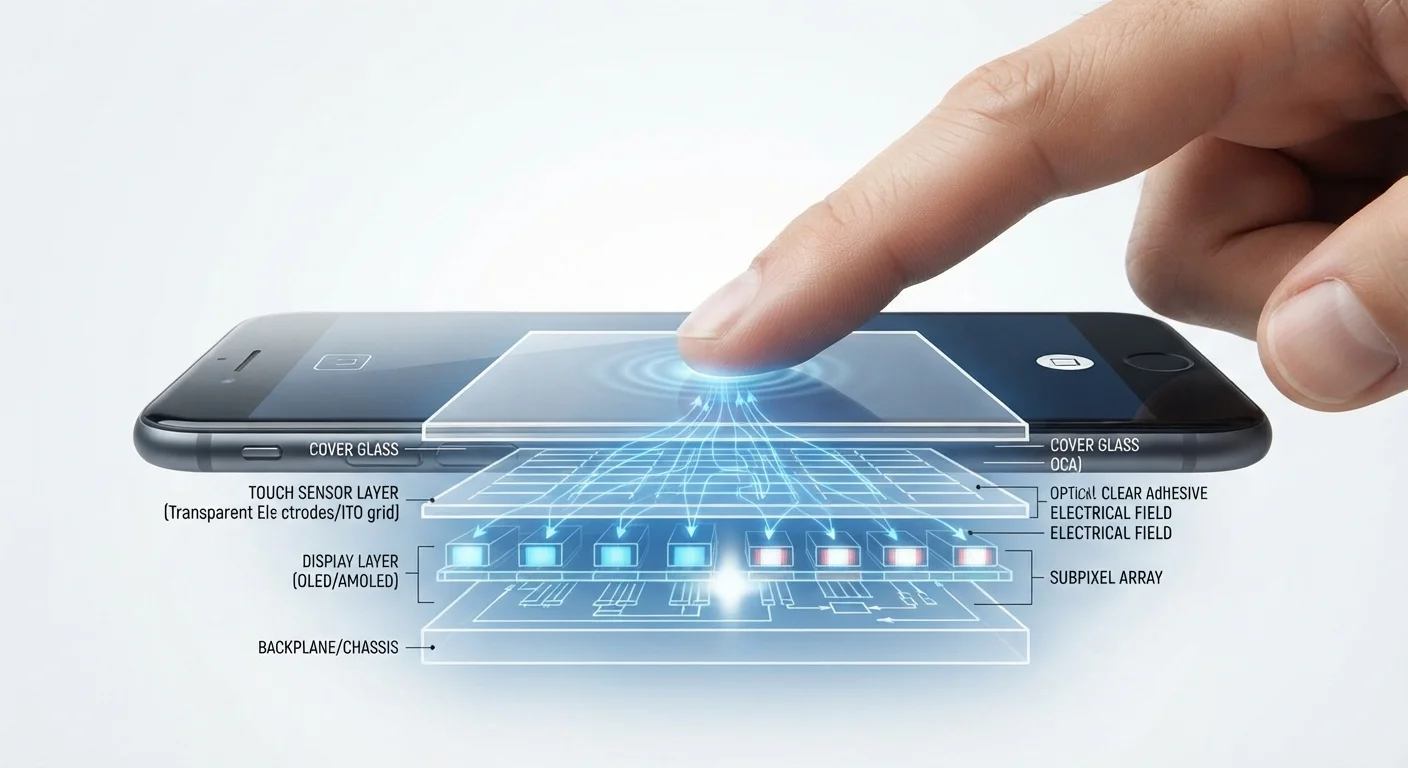
A capacitive screen is coated with a transparent conductor, usually indium tin oxide, arranged in a grid of rows and columns. Your body carries a small electrical charge at all times, and when your fingertip meets the glass, it draws a tiny amount of charge from the nearest grid intersection. Sensors around the screen measure where that charge was pulled, and the device maps that to a pixel coordinate.
Because the screen is responding to electrical conductivity rather than physical force, you do not have to press hard. A light brush is enough. That same grid can track multiple contact points simultaneously, which is how gestures like pinch-to-zoom and two-finger scroll became standard on smartphones.
The tradeoff is specificity: anything that does not conduct electricity well enough will not register. Ordinary gloves block the signal. A standard pen stylus does nothing. Capacitive styluses, such as those designed for drawing tablets, are built with conductive tips specifically to solve this problem.
| Criterion | Capacitive | Resistive |
|---|---|---|
| Input method | Electrical charge (bare skin) | Physical pressure (any object) |
| Multi-touch support | Yes, standard | Typically no |
| Works with gloves | No (standard gloves) | Yes |
| Image clarity | Higher optical clarity | Reduced by layered construction |
| Durability in harsh environments | Moderate | High |
| Common use cases | Smartphones, tablets, laptops | POS terminals, industrial panels, medical devices |
Resistive touchscreens: responding to physical pressure
A resistive screen has two thin flexible layers with a small gap between them. The bottom layer is rigid and coated with a resistive material; the top layer is flexible. When you press anywhere on the surface, the top layer bends down and makes contact with the bottom layer. The screen measures the electrical resistance at that contact point to calculate position.
Because the trigger is pressure, resistive screens respond to fingers, gloves, styluses, credit card edges, and almost anything else firm enough to press the surface. That flexibility is why resistive panels appear in cash registers, medical equipment, car navigation systems from the early 2000s, and industrial control panels.
The physical construction creates limitations. The flexible top layer reduces optical clarity compared to capacitive glass, and because contact is detected at a single pressure point, most resistive panels cannot track two touches at once. Multi-touch gestures are not a natural fit for the technology.
In vehicle infotainment systems, resistive screens once dominated. Many modern vehicles have switched to capacitive panels, though the driving safety considerations around touchscreen distraction remain relevant regardless of which technology the screen uses.
Why consumer devices settled on capacitive
The shift happened for practical reasons. As smartphones became the default personal computing device, the need for multi-touch gestures grew. Pinch-to-zoom, swipe navigation, and two-finger scroll all require a screen that can track multiple points at once, and capacitive technology handles that natively.
Capacitive glass is also optically superior. Because the sensing layer is a single transparent coating rather than a two-layer mechanical stack, light passes through with less distortion and less reduction in brightness. On a device you look at for hours each day, that matters.
90%+
Share of smartphone screens using capacitive technology
Capacitive panels became the dominant touch technology in consumer smartphones during the late 2000s and have held that position since.
2007
Year multi-touch capacitive screens entered mainstream consumer devices
The original iPhone used a projected capacitive display, bringing multi-touch gestures to a mass consumer audience for the first time.
Resistive technology did not disappear. It remained in settings where its pressure-based input is genuinely useful and where multi-touch is not a requirement: point-of-sale terminals, hospital bedside devices, and outdoor kiosks where gloved operators are the norm. In those contexts, the lower cost and input flexibility of resistive panels still make practical sense.