
Pixels, Refresh Rates, and Resolution: A Screen Glossary for Non-Technical Readers

| Standard HD resolution | 1920 x 1080 pixels (Consumer electronics industry standard) |
| 4K resolution pixel count | Approx. 8.3 million pixels (3840 x 2160 grid) |
| Typical smartphone PPI | 400 to 500 PPI (Common range for flagship phones) |
| Common refresh rates | 60 Hz, 90 Hz, 120 Hz, 144 Hz (Varies by device category and price tier) |
| Cinema frame rate | 24 frames per second (Long-standing film industry standard) |
| Outdoor-readable brightness | 1,000 nits or more (General guideline for direct sunlight visibility) |
What a pixel actually is
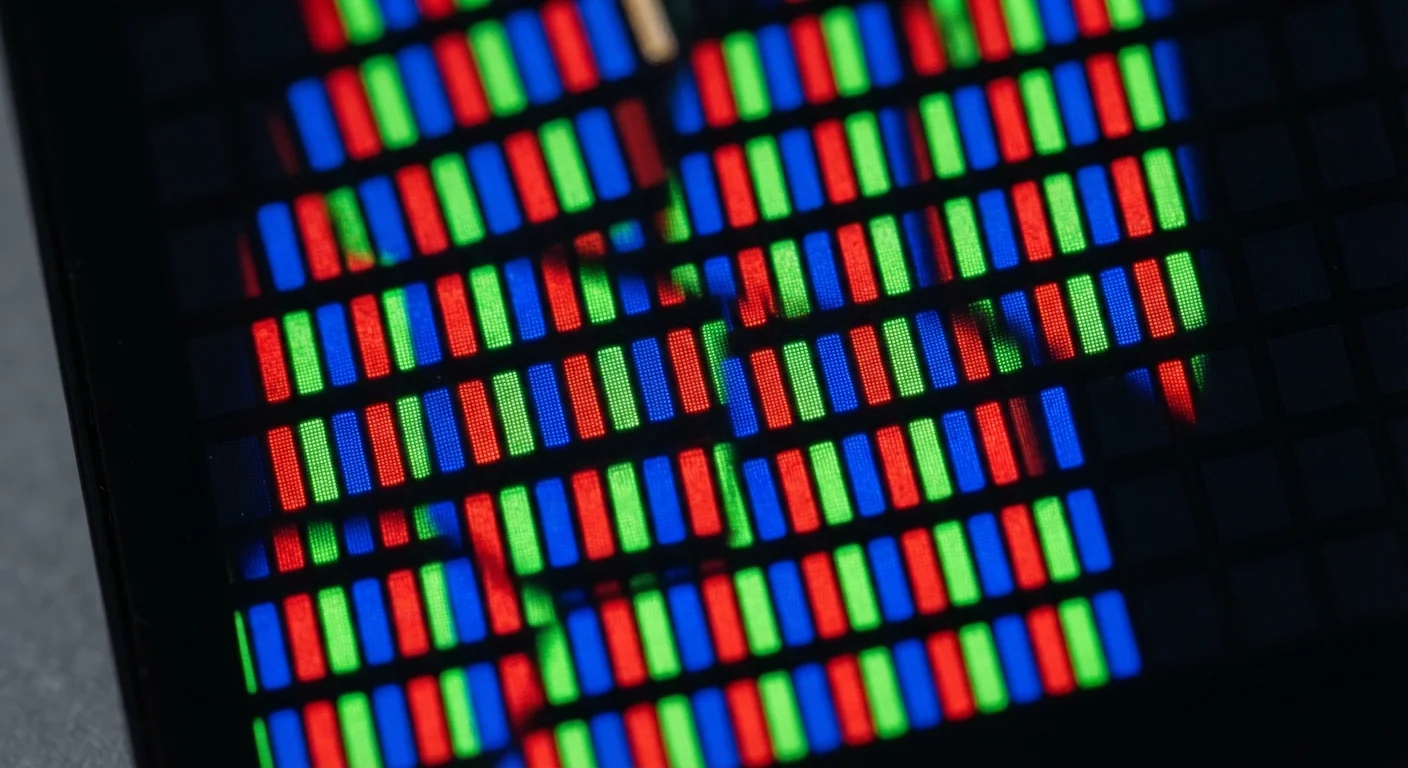
A pixel is the smallest unit of a digital image. The word combines 'picture' and 'element.' On any screen, whether a phone, a laptop, or a television, the image you see is a grid of these tiny dots, each one capable of displaying a specific color at a specific moment.
Each pixel contains three subpixels: one red, one green, one blue. By mixing those three at different intensities, a single pixel can produce millions of distinct colors. Your eye blends neighboring pixels together from a normal viewing distance, so the grid becomes a smooth, continuous image.
Pixel count alone does not determine image quality. How densely the pixels are packed, what colors the screen can produce, and how quickly it refreshes all shape what you actually see. The sections below define each of those factors in plain terms.
Pixel
The smallest individual element in a digital image. Every screen image is made of a grid of pixels, each displaying one color at a time.
Resolution
The total number of pixels in a display, expressed as width by height (for example, 1920x1080). Higher resolution means more pixels and potentially more fine detail.
PPI (pixels per inch)
A measure of how densely pixels are packed into a screen. Higher PPI generally means a sharper image, especially at close viewing distances.
Refresh rate
How many times per second a screen redraws its image, measured in hertz (Hz). A higher rate produces smoother motion.
Nits
A unit of screen brightness. More nits make a display easier to see in bright ambient light, including outdoors.
Color gamut
The range of colors a display can reproduce. Wider gamuts (such as DCI-P3) can show more saturated and accurate colors when the source content supports them.
Contrast ratio
The difference between a screen's brightest white and its darkest black. A higher contrast ratio makes images look more three-dimensional and detailed in dark areas.
OLED
A display technology where each pixel produces its own light and can switch off completely. This allows true black levels and high contrast without a separate backlight.
Response time
How quickly a pixel can shift from one color to another, measured in milliseconds. Lower response times reduce motion blur and ghosting on fast-moving content.
Adaptive refresh rate
A feature that lets a screen automatically vary its refresh rate based on the content shown, saving power during static images while increasing smoothness during motion.
Resolution and pixel density: what the numbers mean
Resolution describes the total number of pixels in a display, stated as width by height. A display listed as 1920x1080 has 1,920 columns of pixels and 1,080 rows, giving roughly 2 million pixels in total. A 3840x2160 display (commonly called 4K) has four times as many.
More pixels allow finer detail, but the screen size matters just as much. A 4K image spread across a 75-inch TV looks sharp from a couch. The same resolution on a 6-inch phone would look extremely sharp up close because those pixels are packed into a much smaller area.
That packing density is measured in pixels per inch, or PPI. A higher PPI means individual pixels are too small to see at a normal viewing distance, so the image looks smooth and sharp. Phone manufacturers sometimes call this a 'Retina' or 'high-density' display, though those are marketing terms for the same physical principle. For a typical smartphone held at arm's length, displays above roughly 300 PPI are generally indistinguishable from higher values, because human vision has limits.
| Standard HD resolution | 1920 x 1080 pixels (Consumer electronics industry standard) |
| 4K resolution pixel count | Approx. 8.3 million pixels (3840 x 2160 grid) |
| Typical smartphone PPI | 400 to 500 PPI (Common range for flagship phones) |
| Common refresh rates | 60 Hz, 90 Hz, 120 Hz, 144 Hz (Varies by device category and price tier) |
| Cinema frame rate | 24 frames per second (Long-standing film industry standard) |
| Outdoor-readable brightness | 1,000 nits or more (General guideline for direct sunlight visibility) |
Refresh rate: the number behind smooth motion
A screen does not show one continuous image. It draws a new still frame many times per second, and the rapid sequence creates the appearance of motion. The refresh rate, measured in hertz (Hz), tells you how many frames per second the display can show.
A 60 Hz screen redraws 60 times per second. A 120 Hz screen redraws 120 times per second. The difference is most obvious during fast motion: scrolling a webpage, playing a video game, or watching sports footage. Higher refresh rates produce smoother, less choppy movement.
There is a ceiling to the benefit. Most films are captured at 24 frames per second. A 120 Hz display cannot add detail that was not in the original footage; it can only interpolate extra frames to smooth playback, which some viewers find unnatural (a phenomenon often called the 'soap opera effect'). For gaming, a higher refresh rate genuinely reduces motion blur and input lag when the device driving the screen can actually produce that many frames.
Many modern phones and monitors use adaptive refresh rates, which adjust dynamically between a low value (such as 1 Hz) when displaying a static image and a high value (such as 120 Hz) during fast motion. This saves battery without sacrificing smoothness. See how emerging display technology applies to spatial computing for a look at how refresh rates factor into headset experiences.
Other specs you will encounter
Display spec sheets include several other terms worth knowing. Brightness is measured in nits; a higher nit count makes a screen readable in direct sunlight. Most indoor screens manage comfortably at 200 to 400 nits. Outdoor use in bright conditions benefits from 1,000 nits or more.
Color gamut describes the range of colors a display can produce. sRGB is the standard for most web content and older video. DCI-P3 is a wider range used in cinema and now common on premium phones and laptops. A display covering a wider gamut can show more saturated, accurate colors when the content was created to use them.
Contrast ratio compares the brightest white to the darkest black a display can show simultaneously. OLED screens produce true black by turning individual pixels completely off, giving them effectively infinite contrast. LCD screens use a backlight that stays on, so dark areas are never fully black, though local dimming technology reduces this gap. For more on how the screen you touch connects to these specs, see how touchscreens detect input.
Response time, measured in milliseconds, indicates how quickly a pixel can change from one color to another. Lower values reduce 'ghosting' (a faint trail behind fast-moving objects on screen), which is noticeable mainly in gaming contexts.
Understanding these terms together gives you a more complete picture than any single number can. A phone with a very high resolution but a dim, narrow-gamut panel may look worse in practice than one with a moderate resolution and strong brightness and contrast. The goal when evaluating any screen is to weigh the whole set of specifications against how and where you plan to use the device.