

Key Takeaways
- Lithium-ion batteries store energy chemically and release it as electricity through ion movement.
- Each charge and discharge cycle causes microscopic wear that gradually reduces total capacity.
- Heat is the biggest accelerant of battery degradation in everyday consumer devices.
- Keeping a battery between roughly 20% and 80% charge tends to slow capacity loss over time.
- Most phone and laptop batteries retain adequate capacity for several years of normal use.
Lithium-ion battery
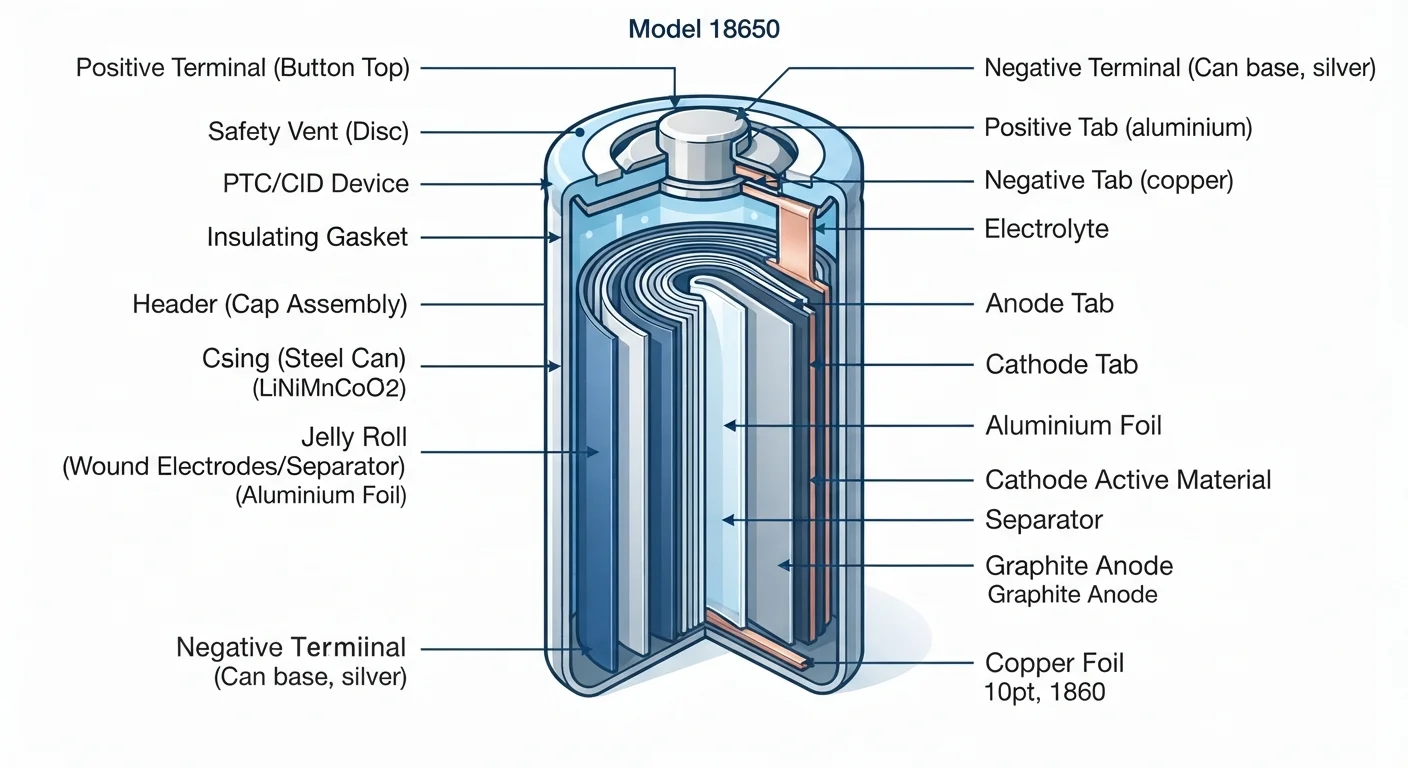
A lithium-ion battery is a rechargeable power source that stores energy by moving lithium ions between two electrodes. When you charge the battery, ions travel in one direction; when you use the device, they travel back, releasing electrical energy in the process. This chemistry is used in phones, laptops, earbuds, and thousands of other consumer electronics.
The two electrodes are called the anode (typically graphite) and the cathode (often a lithium metal oxide). An electrolyte solution allows ions to move between them while preventing direct electron flow inside the cell.
How a lithium-ion cell actually works
Inside every lithium-ion battery are two electrodes separated by a thin, porous membrane soaked in an electrolyte solution. One electrode is the anode, made primarily of graphite. The other is the cathode, made of a lithium-containing compound such as lithium cobalt oxide or lithium iron phosphate. The electrolyte is not conductive to electrons, but it does allow positively charged lithium ions to pass through.
When you plug in your phone or laptop to charge, an external power source pushes electrons through the circuit and forces lithium ions out of the cathode and into the anode, where they nestle between layers of graphite. The battery is now storing energy in a chemical form.
When you use the device, the process reverses spontaneously. Lithium ions migrate back through the electrolyte from the anode toward the cathode. Electrons, unable to cross the electrolyte, travel through the external circuit instead, powering your screen, processor, and everything else along the way. That electron flow is the electrical current your device runs on.
The components inside your smartphone all draw on this current, which is why a more powerful processor or brighter display depletes the battery faster.
Why batteries degrade over time
No charge cycle is perfectly reversible. Each time lithium ions travel between the electrodes, tiny amounts of material are lost or structurally altered. Graphite in the anode develops cracks. Cathode compounds can shed small amounts of lithium that never return to the cycle. A thin film called the solid electrolyte interphase builds up on the anode surface and consumes some lithium permanently.
The result is a slow but steady reduction in the number of lithium ions available to move. Because capacity is directly tied to how many ions can shuttle between electrodes, the battery stores less energy over time. This is why a phone that once lasted a full day may only reach the afternoon after two or three years of use.
~80%
Capacity retained after 500 charge cycles
Most lithium-ion consumer cells are engineered to hold roughly 80% of original capacity after 300 to 500 full charge cycles under standard test conditions.
25 C
Optimal storage temperature for lithium-ion cells
Battery research published by institutions including Argonne National Laboratory consistently identifies room temperature (around 25 degrees Celsius) as the range that minimizes degradation during storage.
2-4 years
Typical practical lifespan in smartphones
Consumer electronics teardown and longevity data generally place the practical daily-use lifespan of a smartphone battery at two to four years, depending on charging habits and usage intensity.
Temperature accelerates every one of these processes. Heat causes the electrolyte to break down faster, speeds up the growth of that interphase film, and can degrade cathode materials more aggressively. Cold temperatures do not cause permanent damage in the same way, but they temporarily slow ion movement, which makes a cold battery appear weaker than it actually is.
Practical habits that slow capacity loss
Battery chemistry responds to the conditions you keep it in. Storing or frequently charging a battery at 100% for extended periods keeps the cathode under higher stress. Draining it to 0% repeatedly stresses the anode. A partial charge range, roughly between 20% and 80%, reduces that stress and tends to produce slower capacity loss over the battery's life.
Heat management matters more than most people expect. Charging a device while using it intensively generates heat from both the battery and the processor simultaneously. Removing a thick case during long charging sessions can help dissipate heat, particularly on phones that warm noticeably during charging.
Use your device's built-in battery health tools
Both iOS and Android include battery health or charging optimization settings that can slow capacity loss over time. On iOS, navigate to Settings, then Battery, then Battery Health and Charging. Android devices vary by manufacturer but typically include similar options under Settings, then Battery. Enabling optimized or adaptive charging lets the software manage the charge cycle on your behalf.
Software features on many modern phones and laptops allow the device to learn your schedule and pause charging before 100%, then top up just before you typically unplug. These features exist precisely to reduce the time the battery spends at full charge.
What this means for phones, laptops, and earbuds
The same chemistry governs every lithium-ion device, but the consequences of degradation differ by form factor. A phone with reduced battery capacity is inconvenient. A laptop with degraded cells may no longer run reliably without being plugged in. Earbuds have very small cells with limited room for engineering compromises, so their batteries often show noticeable capacity loss sooner than larger devices do.
Battery replacement is possible on many devices, though it varies in difficulty and cost. Some manufacturers design for easier replacement; others prioritize thinness in ways that make battery access difficult. Checking whether a device's battery is user-serviceable or requires professional replacement is worth knowing before a purchase, not after.
On average, a smartphone battery retains enough capacity for practical daily use across two to four years, depending on usage intensity and charging habits. Laptops with larger cells and lower discharge rates often fare better over the same period.